


Implement Lead Scoring in HubSpot With Fit Over Engagement
Are your sales reps chasing “hot” leads that never convert, while quieter but qualified prospects sit untouched in the CRM?
That problem usually traces back to how teams implement lead scoring in HubSpot CRM. Specifically, collapsing fit and engagement into one misleading number.
Most HubSpot lead scoring setup efforts rely on a single score that combines who someone is with what they’ve done. The result feels logical on paper, but it breaks down fast in the real world. A highly engaged, fundamentally unqualified lead jumps to the top of the list. A qualified buyer who’s moving more slowly disappears. Sales stops trusting the score, and the system quietly fails.
This guide shows you a smarter way forward. You’ll learn how to set up lead scoring in HubSpot using a dual-score framework that separates “Can they buy?” from “Are they interested right now?”. We’ll also walk through the “view gate” strategy that protects sales trust, the shared ownership model between marketing and sales, and the only success metrics that actually matter: response rates, conversations, and deal velocity.
Key Insights: What You Need to Know Before Building Your Scoring Model
- Separate fit from engagement: HubSpot’s 2024 scoring tool supports independent scoring for these dimensions. Use it to prevent “hot but unqualified” leads from flooding sales views.
- Filter the view, not the score: Calculate scores for everyone, but gate what sales sees using lifecycle stages or fit-based filters.
- Prioritize score decay over negative attributes: Time-based decay controls inflation better than overbuilt negative scoring rules.
- Marketing builds, sales validates: Marketing sets the initial model using historical data; sales refines it through real conversations. Revisit annually.
- Startups should skip fit at first: Early-stage teams should run engagement-only scoring until they have enough closed deals to define an ICP.
Why Single-Score Systems Fail (And How to Fix Them)
Every effective scoring model answers two different questions, and confusing them creates chaos.
First: Can they realistically buy? Here, fit qualifies the lead. This comes from contact properties like role, company size, industry, and authority.
Second: Are they interested right now? Engagement signals timing. This comes from behavioral scoring — page views, form fills, email replies, and other engagement metrics.

A single score blurs these signals together. Sales sees a high number and assumes readiness. Then comes the letdown: A student researching a class project, a job seeker poking around careers pages, or a competitor downloading content for “research.”
There lies the trap. Sales stops trusting the score and lead prioritization falls apart.
HubSpot’s newer scoring capabilities finally let you fix this. You can now build separate demographic scoring (fit) and behavioral scoring (engagement) models. Each tells a different story, and together, they give you clarity.
The “View Gate” Strategy: Calculate Everything, Show Selectively
Many teams overcorrect when they stop scoring non-fit leads entirely. That might feel clean, but it’s shortsighted.
Instead, continue scoring everyone in the background. A non-fit lead today could become a perfect fit later through a job change or company growth. In short, engagement history matters!
Here’s the key: The real control lives in the sales view, not the score itself.
- Scores are calculated for all contacts behind the scenes.
- Sales-facing “Hot Leads” views include mandatory filters — lifecycle stages like marketing-qualified leads or sales-qualified leads, or hard fit criteria.
- High scores only appear when they’re attached to qualified profiles.
This approach protects data continuity while preserving sales trust. Reps see high scores and know they’re worth attention, while marketing keeps the full history intact. Everyone wins.
Align Scoring to Your Qualification Framework
Lead scoring works best when it complements, not duplicates, your qualification process.
Most teams already use some version of BANT. HubSpot can support this cleanly when each component has a job:
- Authority & Need: Captured through forms, enrichment, and HubSpot properties.
- Timing: Captured through your lead score.
- Budget: Left for sales conversations.
This division of labor keeps your scoring model focused because you’re measuring intent. That clarity makes lead routing faster and conversations sharper.
Analyze Closed-Won Data for Micro-Events, Not Just Volume
Closed-won deals hold the answers, but only if you ask the right questions. Looking at total clicks or lifetime activity rarely tells you why someone converted. Rather, they only serve to blur the facts.
Instead, break down the micro-events that happened before conversion:
- They downloaded a pricing guide.
- Two days later, they visited the demo page.
- Within 48 hours, they submitted a contact form.
That sequence matters more than total activity volume. Those are the behaviors worth weighting as positive scoring attributes.
One question unlocks this insight fast: What specific micro-events tell you a lead is ready to convert? Sales answers this far better than dashboards ever will.
Score Decay Over Complexity, Engagement-Only for Startups
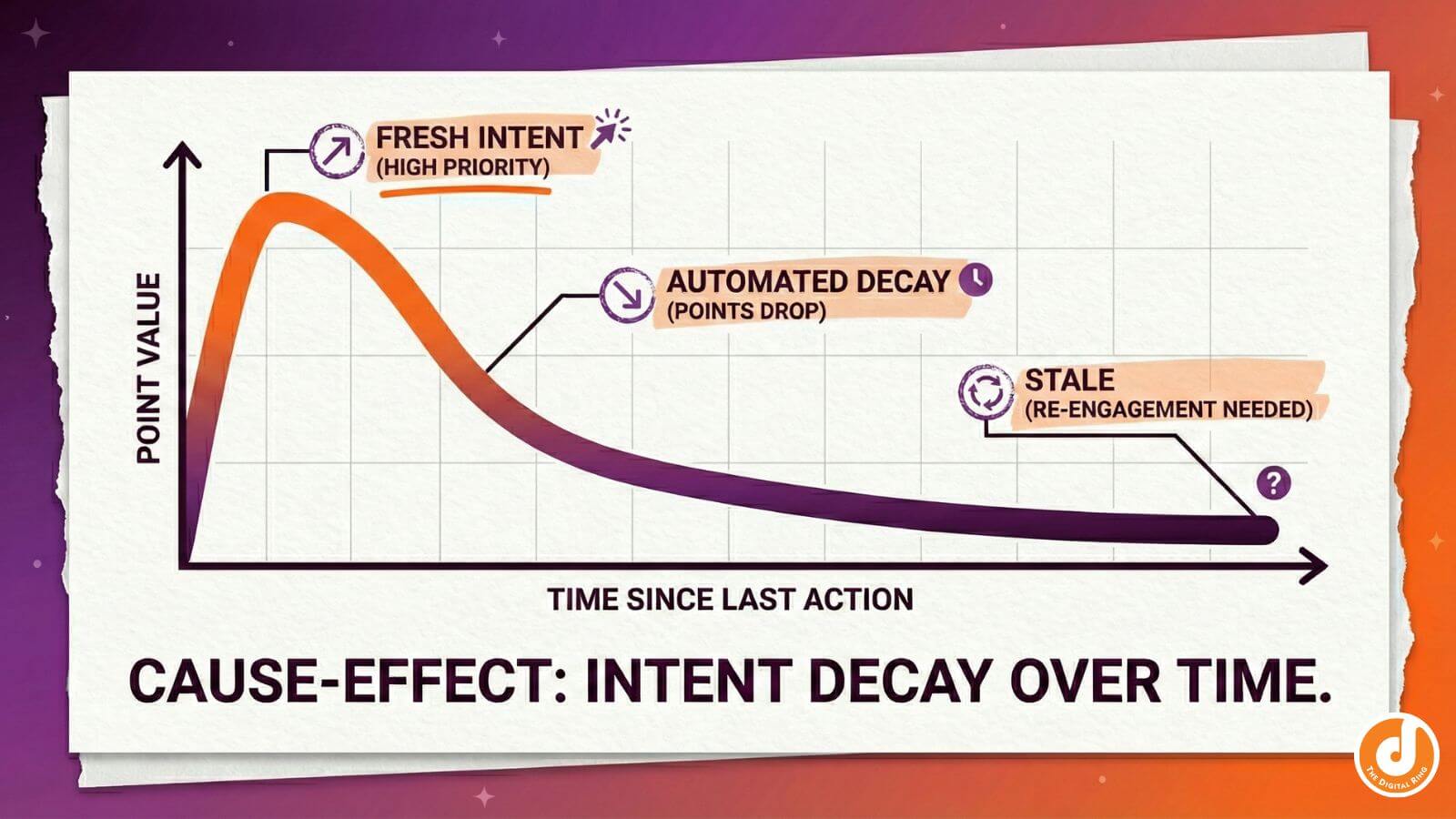
Scoring inflation kills credibility. Old activity shouldn’t carry the same weight as fresh intent.
That’s why score decay matters more than elaborate negative scoring attributes.
Time-based decay steadily reduces points after inactivity. Yesterday’s demo request stays valuable. Last year’s ebook download fades into the background. Your scoring threshold stays meaningful.
Negative attributes still have a role—unsubscribes, spam complaints, clear disqualifiers—but they shouldn’t be the backbone of your system if your views are gated correctly.
Startup Strategy: Engagement-Only Until You Define Your ICP
Early-stage teams often try to score for fit too soon. Without enough closed deals, fit criteria are guesses disguised as logic.
Here’s a better path:
- Run engagement-only scoring at first.
- Focus on actions that show real interest (demo requests, replies, pricing views).
- Close deals.
- Analyze who actually bought.
After 20-30 deals, patterns emerge. That’s when demographic scoring actually becomes useful instead of purely speculative.
Measure Success Through Sales Experience, Not Dashboards
A perfect scoring chart doesn’t close deals. Real success shows up elsewhere through higher reply rates, faster follow-up, shorter sales cycles, and better conversations. That’s how you evaluate a HubSpot lead scoring setup.
Quarterly, skip the graphs and ask sales a simple question: Are the leads we’re flagging as hot actually converting faster? If the answer is no, adjust. If they’re qualified but quiet, refine engagement logic. If they’re engaged but unqualified, tighten fit filters. This feedback loop keeps scoring grounded in reality.
Ready to Build Lead Scoring That Sales Actually Trusts?
If you want help designing a scoring model that balances fit, engagement, and real-world sales behavior, our team can help. Learn more about our approach to HubSpot strategy and implementation through our HubSpot consulting services, and start turning your CRM into a tool Sales actually believes in.
share this article
.jpg)

Get In touch
We’d love to share how digital marketing can help elevate your brand — and your business’s bottom line.


821 E Washington Ave #200
Madison, WI 53703
608.836.7464


