


HubSpot CRM Setup Guide: Build for Real Adoption
Most HubSpot CRMs fail because they’re set up without a clear structure or a plan for how teams will actually use them. But when HubSpot setup is done thoughtfully, teams move faster, data stays clean, and leadership gains real visibility into what’s happening across Sales and Marketing. In 3 simple steps, this guide explains how to set up HubSpot in a way that supports daily work, encourages consistent use, and creates a CRM your team will happily rely on.
Step 1: Preparing and Designing the System
Start With CRM Foundations Before You Import Anything
Your HubSpot setup needs to reflect how your business actually operates before data or automation enters the system. That means configuring the fundamentals first, even if it feels slower up-front.
Start with account-level essentials like users, roles, permissions, currency, language, and security settings. These choices determine who can see what, who owns which records, and how data flows across teams. When ownership and access aren’t clearly defined, reporting becomes unreliable and adoption suffers almost immediately.
We’ve worked with plenty of different teams, so take it from us: Skipping foundational setup creates cascading problems later. Teams end up working around the CRM instead of inside it, and fixing those gaps after launch is far more painful than getting them right from the start.
Define Properties That Match Real Business Processes
Clean, intentional properties are the backbone of a user-friendly CRM. They’re how HubSpot understands your data and how your team understands their work.
Default HubSpot properties are built-in fields that support standard CRM functions out of the box, while custom properties are fields you create to track information unique to your business. The key here is restraint. Not every idea needs a property.
Focus on “need-to-have” fields that directly support sales, marketing, or operations. Every extra field adds friction, confusion, and filtering complexity. Property sprawl leads to broken lists, inconsistent reporting, and a CRM that feels harder to use than the spreadsheet it replaced.
Clean and Structure Your Data Before Importing
Ever heard the saying, “junk in, junk out”? Data quality at import determines CRM success for months. If messy data goes in, messy outcomes come out.
Before migrating anything, map your existing fields to HubSpot properties so you know exactly where data will land. Deduplicate aggressively, standardize formats, and clean up incomplete records to avoid garbage-in, garbage-out scenarios. This is key considering that poor data quality is cited as the #1 HubSpot implementation mistake.
Phased imports reduce risk significantly. Start with core contacts and companies, confirm that everything works as expected, then layer in deals, activities, and historical data once the structure is proven.
.jpg)
Step 2: Moving the Data
The effort put into a clean migration pays dividends in efficiency; in fact, HubSpot users see an average 68% reduction in campaign launch time once their systems are integrated.
Connect Email and Core Tools to Eliminate Manual Work
Email and tool integrations are where HubSpot starts to feel useful instead of burdensome. Connecting inboxes allows emails, replies, and engagement to log automatically, removing the need for manual data entry.
Set up domain and SSL connections if you plan to publish HubSpot content. Integrate calendars, meetings, and your website to prevent siloed data. The more activity HubSpot captures automatically, the faster your team trusts the system — and the more likely they are to use it consistently.
Configure Sales Pipelines and Lifecycle Stages With Intent
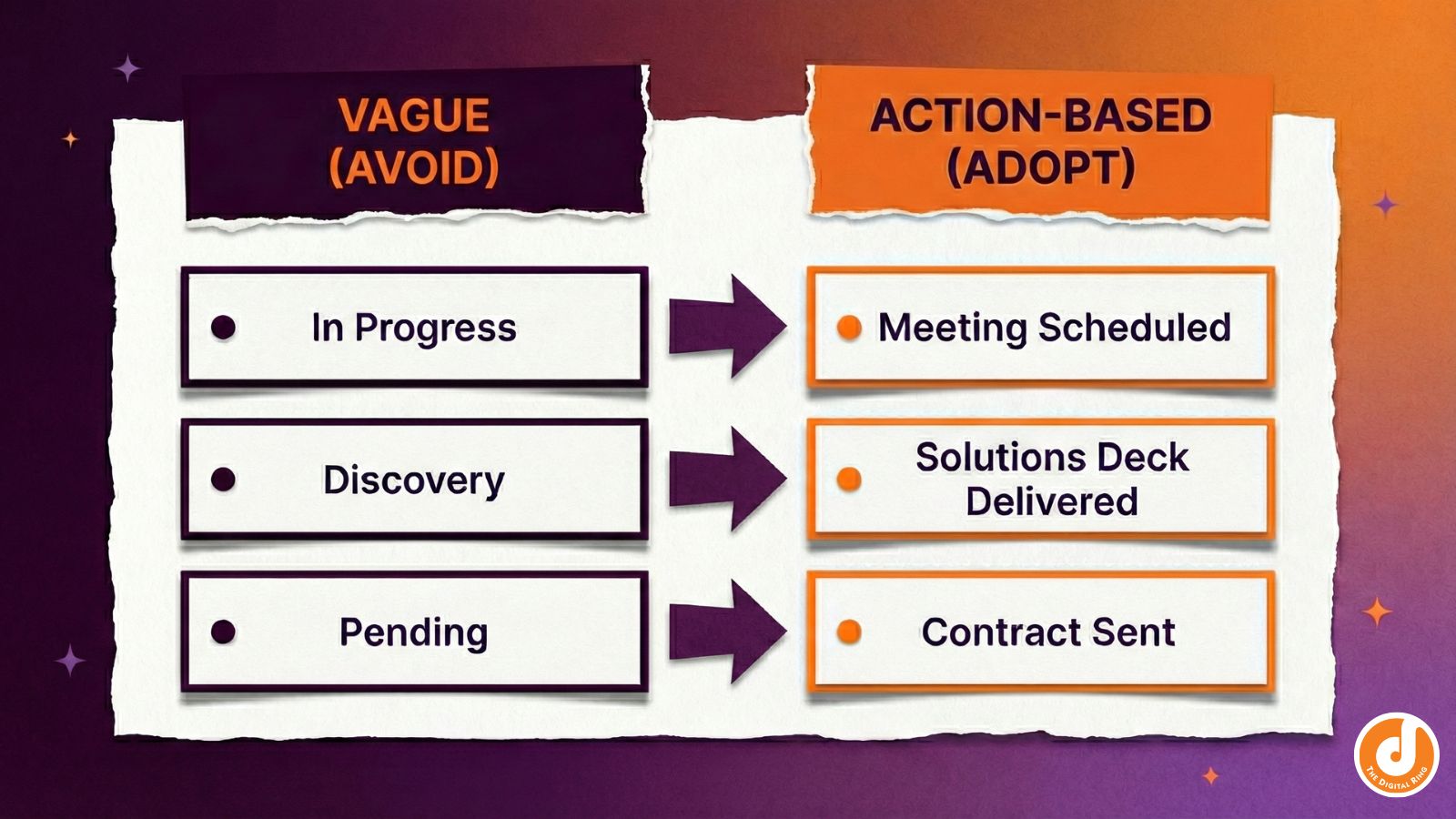
With HubSpot, it’s critical to avoid wishful thinking.. Your CRM should mirror how deals actually move, not how you wish they did. Pipelines work best when each stage represents a real action rather than a vague status update.
Define deal stages based on concrete steps: meetings held, proposals sent, or contracts reviewed. Then align lifecycle stages with clear sales and marketing responsibilities so handoffs make sense internally.
When pipelines and lifecycle stages don’t match reality, forecasting breaks down, reports become misleading, and leadership loses confidence in the data.
Step 3: Optimize Behind the Scenes
Make Data Visible Quickly to Drive User Adoption
Seeing real-time data at work is the fastest way to overcome resistance. Dashboards and reports should immediately show reps their activity, progress, and impact.
These early “aha moments” accelerate learning far more effectively than training alone. When users can see their calls logged, deals moving, and pipelines updating in real time, CRM usage becomes self-reinforcing.
Layer Automation Only After the CRM Foundation Is Solid
Automation amplifies structure (good or bad) depending on your setup. That’s why it should come after the foundation is in place.
Introduce workflows and scoring only after properties, ownership, and pipelines are working cleanly. Poor data hygiene breaks automation logic and creates unpredictable outcomes that erode trust quickly. Starting simple allows teams to iterate, while over-engineering too early forces painful rebuilds later.
Governance, Documentation, and Ongoing Maintenance
A CRM without ownership slowly degrades, even if it looks clean at launch. Governance keeps things usable over time.
Set clear naming conventions and document how properties, pipelines, and processes are meant to work. Spot-check records regularly, review CRM health, and treat setup as an evolving system, not a one-and-done project. Consistency protects adoption long after launch.
When to Get Help With HubSpot CRM Setup
Strategic guidance prevents expensive rework and stalled adoption. HubSpot partners can make technical setup a breeze — but they also bring structure, prioritization, and real-world experience that internal teams often lack early on.
A strong partner reduces setup timelines, avoids common pitfalls, and helps teams focus on what truly matters first. Internal teams should own day-to-day usage over time, but outside expertise is often invaluable during initial design and migration.
If you want your HubSpot CRM setup to actually stick, a little guidance up front can save months of cleanup later.
Ready to set HubSpot up the right way? Let’s talk through your goals, your team, and what success should look like before anything gets built.
share this article
.jpg)

Get In touch
We’d love to share how digital marketing can help elevate your brand — and your business’s bottom line.


821 E Washington Ave #200
Madison, WI 53703
608.836.7464


