


HubSpot Workflows vs Sequences: Email Automation Guide
Stop losing qualified leads because of confusion over when to use HubSpot workflows versus sequences. This mix-up is one of the quietest pipeline killers we see, and it shows up everywhere. How do HubSpot sales sequences differ from workflows? If your team can’t answer that quickly, you’ll see missed handoffs, awkward outreach, and sales teams chasing contacts who were never ready.
At a high level, the HubSpot difference between workflow and sequence is simple: workflows are built for scalable marketing automation, while sequences are designed for sales automation through personal conversations. It sounds simple enough, but the problem lies in knowing when to apply each tool in real, messy, day-to-day operations.
When you get HubSpot automation right, the platform stops feeling like two competing tools and starts working like a coordinated system. You’ll see faster sales cycles, less manual work, lower stress, and a straighter path from interest to revenue.
In this guide, you’ll get a clear decision framework, practical engagement signals, and team processes that help you master workflow automation and sequences in HubSpot without creating chaos.
Quick Wins: Match Workflows and Sequences to Intent
Before we go deep, anchor yourself with a few rules that prevent most mistakes around sequence vs workflow HubSpot decisions.
- Use sequences when personalization is real: If you can’t call out something specific about the contact, their role, or their situation, your segmentation isn’t tight enough for sequences. Personalized outreach without context starts to feel fake fast.
- Use workflows for behavioral scale: When you need trigger-based actions like automated emails based on page visits, form submissions, or lifecycle changes, all without a sales rep touching it, you're using workflow rules.
- Watch account-level engagement: If multiple people from the same company visit your site within a short window, that’s a buying signal. Don’t just look at individual contacts. Trigger alerts, sales rep follow-up, or move the account toward sales action.
- Set explicit Sales and Marketing SLAs: Lifecycle stages, pipeline stages, or lead scoring should clearly tell sales when a lead is hot enough for personal outreach. Guessing here creates friction every time.
- Match email style to expectations: People expect branded emails when they’re learning. They expect person-to-person emails when they’re buying. Forcing one into the other breaks trust.
How Do HubSpot Sales Sequences Differ From Workflows?
You need to understand one foundational truth about the difference between the workflows and sequences HubSpot offers: sales sequences automate one-to-one emails and relationships, while workflows automate CRM records and systems.
Email sequences should feel like a phone call that happened to be written down. If an email wouldn't make sense spoken out loud on a sales call, it doesn't belong in a sequence. These messages are personal, contextual, and intentionally limited in volume.
Workflow automation, on the other hand, handles the heavy lifting. Workflows power lead nurturing, internal notifications, lifecycle transitions, and data hygiene. They reduce admin work while keeping marketing communication consistent and measurable.
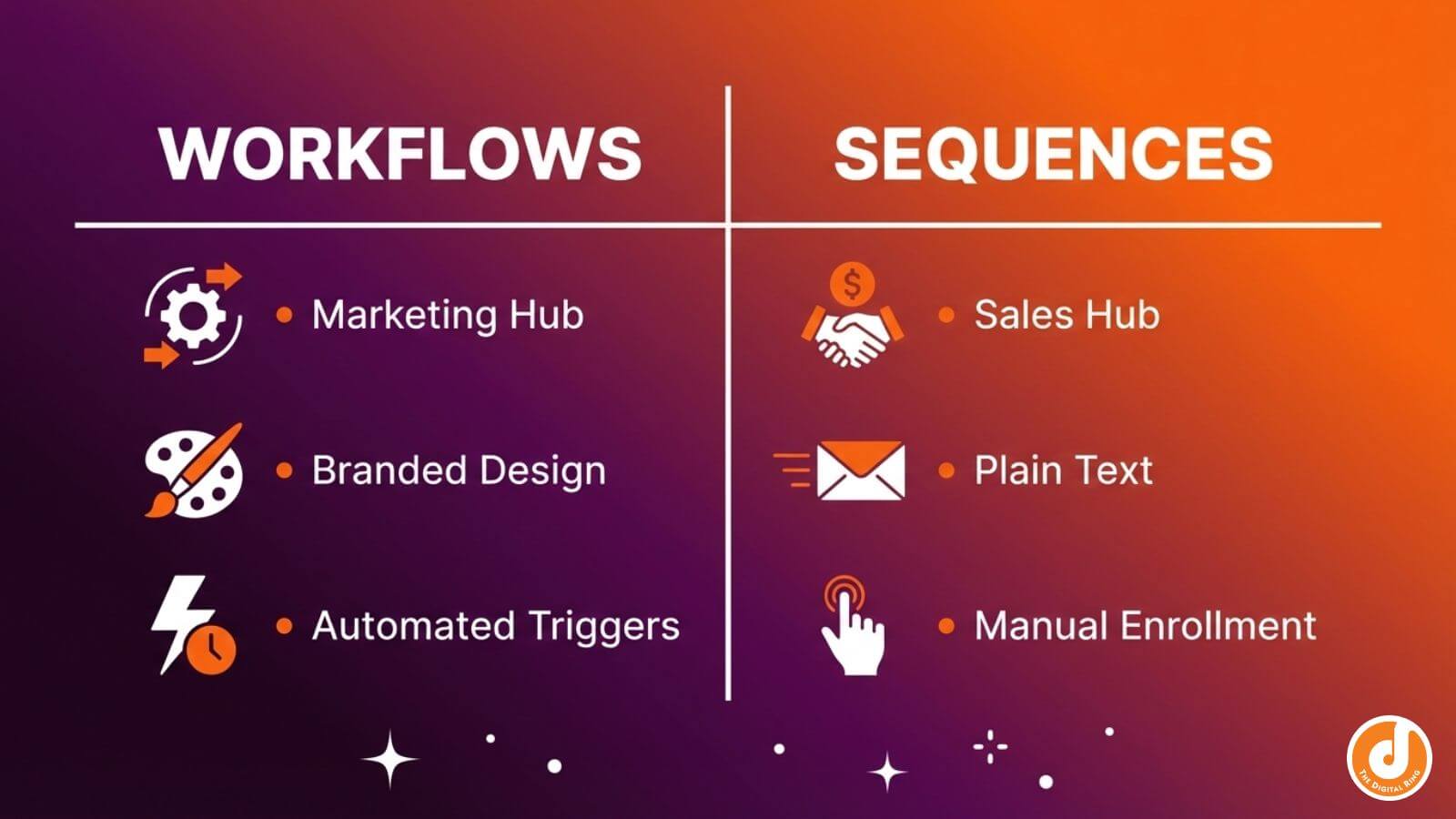
Contacts understand this distinction intuitively. They expect branded emails when they’re researching and learning, and they expect personal emails when someone is reaching out directly. Blurring those lines creates confusion and erodes credibility.
There are also practical considerations. Sequences require HubSpot Sales Hub Professional and a connected inbox. Workflows live in Marketing Hub and don't rely on personal email connections. Both tools integrate directly with HubSpot CRM to track contact activity and engagement. Knowing this up front helps you plan without hitting access roadblocks later.
Use Prospect Engagement Before Personal Sequences
Personal outreach only works when it’s earned. Without prospect engagement signals and proper segmentation, sequences become noise instead of conversation.
Lifecycle stages, pipeline stages, and lead scoring should act as your shared SLA between Marketing and Sales. When a contact reaches a defined stage or score, sales knows it’s time to step in and pipeline management stays clean. Until then, workflows carry the load.
Engagement signals matter more than form fills alone. Multiple web visits, returning to emails, interacting with ads, or revisiting pricing pages all indicate intent. These behaviors should trigger task creation, alerts, or account-level visibility.
In account-based industries, single contacts rarely tell the whole story. If five people from one company visit key pages in a week, that’s a buying committee forming. Ignoring that signal means missing momentum while competitors move faster.
Set combined engagement thresholds that trigger action. When an account crosses the line, sales follow-up should happen immediately. This prevents hot accounts from going cold simply because no one noticed the pattern.
And finally, segmentation and sequence enrollment criteria determine whether sequences belong at all. If you can't reference something specific in your outreach, your data isn't ready for personal automation yet.

HubSpot Difference Between Workflow and Sequence in Practice
Understanding the mechanics behind HubSpot workflow vs sequences matters because workflow enrollment and sequence enrollment shape how contacts experience your outreach.
Sequence Enrollment Preserves Human Conversation Threads
Sequences are designed to feel human. Contact enrollment is manual and intentional, with sales reps enrolling small batches through their connected inboxes. In fact, sequences require manual enrollment except in Enterprise tier, a design choice that keeps outreach focused and controlled.
Sequence emails create a personalized email cadence that looks like regular inbox messages; no heavy design, no marketing chrome. Just clean prospect communication that blends naturally into an existing thread. One of the biggest advantages of sequences is auto-unenrollment.
Because sequences are meant for sales engagement rather than volume, constraints are built in on purpose. Limited emails, enrollment caps, and pacing rules exist to prevent misuse. Sequences also work best when paired with other touches, like calls or LinkedIn messages, light persistence that mirrors how real sales happen.
Workflows Use Trigger-Based Automation at Scale
Unlike the personalized nature of sequences, workflows are built for scale. Workflow enrollment happens automatically based on workflow triggers like page views, form submissions, or property changes. Marketing emails inside workflows support rich design, personalization tokens, smart rules, conditional branching, conditional logic, and branded templates. Contacts instantly recognize them as company communications. However, marketing emails in workflows cannot track replies, which is why they're built for broadcasting rather than conversations. Because they look like marketing emails, workflow messages often land in promotional tabs. That's normal (and expected) for this type of trigger-based automation.
Another difference is that contact-based workflows don't stop unless you tell them to. Workflow rules, goals, exit criteria, and re-enrollment settings must be built intentionally, or contacts will continue through every step regardless of engagement. Workflows also power task automation, task creation, deal stage automation, and bulk actions. Tasks, property updates, notifications, and data cleanup all live here. This is where systems get cleaned up behind the scenes.
Team Alignment Keeps Workflows and Sequences From Competing
Even the smartest HubSpot automation tools can still fail when teams aren't aligned. Without shared ownership, workflows vs sequences in HubSpot become competing tactics instead of complementary systems.
Leadership alignment sets the tone. When Marketing and Sales operate in silos, tools get misused. When they work together in the trenches, workflows feed sequences instead of fighting them.
For smoother collaboration between marketing and sales teams, split ownership clearly: Marketing should own the broad, scalable work, while sales should manage high-value personal interactions. This division keeps each team focused on what they do best.
Zooming in even further, a small, knowledgeable group should own the HubSpot instance. Duplicate fields, unclear contact properties, and messy data break automation faster than bad strategy ever could.
Measurement also needs clarity. Sequences are judged by replies, meetings, and movement through the deal pipeline. Workflows are measured by open rates, click rates, goal completion, and conversion progress. Mixing those metrics muddies decision-making.
Core rule: Every workflow should have a purpose. If you can’t clearly state its objective, it doesn’t belong in your system yet.
When workflows and sequences are used correctly, HubSpot stops feeling overwhelming. You get cleaner handoffs, faster cycles, and fewer fires to put out. More importantly, your outreach starts matching how people actually expect to be communicated with, which is where trust, momentum, and revenue all begin.
If your team is still guessing when to use workflows versus sequences, it’s time to bring clarity to the system you’re already paying for. Let’s audit how your HubSpot instance is being used today and build a workflow-and-sequence strategy that actually supports your sales motion, get in touch today.
share this article
.jpg)

Get In touch
We’d love to share how digital marketing can help elevate your brand — and your business’s bottom line.


821 E Washington Ave #200
Madison, WI 53703
608.836.7464


