


Paid Media Attribution: Track Ad Spend to Closed Revenue
There’s a familiar moment in paid media reporting when every platform seems to have a different answer to the same question: How did the campaign actually perform? Everyone’s numbers are technically real, but they’re also each telling a slightly different story.
That’s where paid media attribution gets messy, especially in B2B. A click can happen today, a form fill next week, an opportunity next month, and closed revenue three months after that. Along the way, Google Ads, Meta, LinkedIn, Google Analytics, and your CRM are applying different attribution windows, models, date rules, and identity-matching logic to the same customer journey.
Trying to make every total match perfectly is usually a losing battle. A better measurement approach starts with deciding what each system is responsible for telling you, then connecting campaign activity to the strongest business outcome you can reliably measure.
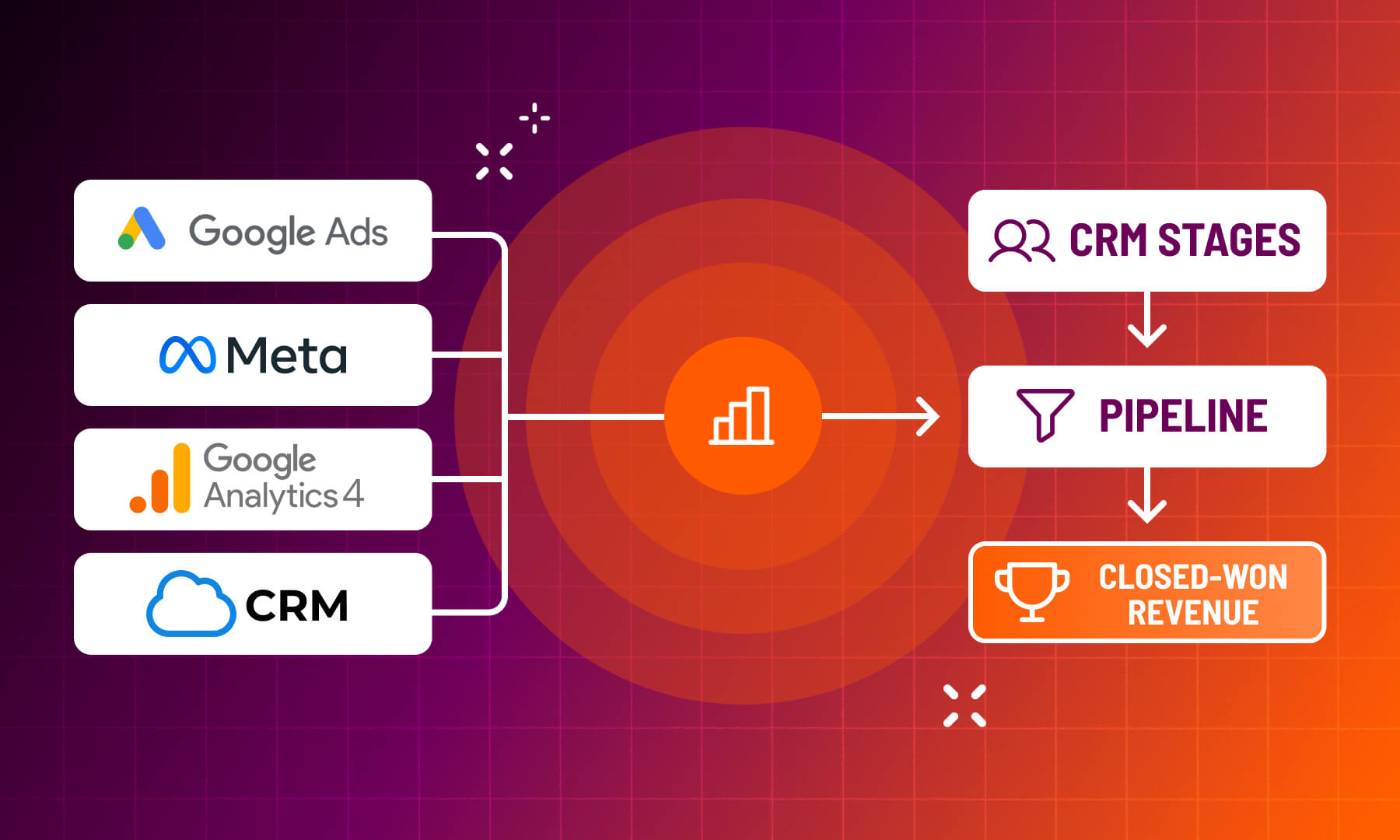
That means using platform metrics to optimize campaigns, carrying useful source and campaign data into the CRM, watching qualified pipeline and closed-won revenue as they mature, and being very clear about what “attributed” actually means before someone turns a dashboard number into a budget decision.
Key Takeaways for Value-Based Paid Media Reporting
- Use the closest reliable business outcome you have. Closed-won revenue is great when the sales cycle and CRM data support it. Earlier conversions such as qualified leads or opportunities may be more useful for day-to-day optimization.
- Set the measurement rules before comparing reports. Attribution model, conversion window, lifecycle stage, report date, and source definition all affect what appears in the final number.
- Give each system a job. Platforms are useful for optimizing media. GA4 helps explain digital journeys. Your CRM should carry the business outcome when the data is reliable enough to support it.
- Expect disagreement. Google, Meta, LinkedIn, analytics platforms, and CRMs credit customer journeys differently. Reconciliation is about understanding the gap, not forcing everything into one total.
- Respect conversion lag and channel roles. Recent campaigns may still be developing, and a channel with fewer last-mile conversions may still be creating demand that another channel ultimately captures.
Start With the Business Value You Need to Prove
Paid media gives you no shortage of numbers, but the trick is deciding which ones deserve to influence actual business decisions.
Impressions, clicks, CTR, CPC, conversion rate, and cost per conversion all have a job. They help you understand whether campaigns are reaching people, attracting attention, spending efficiently, and getting users to take the next step. If CTR suddenly falls off a cliff, we would very much like to know about it. But none of those metrics can necessarily tell you whether the campaign created meaningful business.
For B2B advertisers, the better question is how close you can get to revenue without choosing a conversion event so rare or delayed that it becomes useless for optimization. For an e-commerce advertiser, a purchase can often serve as the primary outcome. That’s not how it works with B2B. You may need to work with qualified leads, estimate requests, meetings, or opportunities while closed-won data catches up.
In our own paid media work, leads are often the most practical day-to-day conversion signal because they happen frequently enough to give campaigns something to optimize against. The important part comes afterward. Eventually, you need to know whether those leads turned into actual business.
Volume alone can be deeply flattering. Nothing makes a marketer blush like tons of form fills, right? The ugly truth is that volume can also be full of spam, poor-fit prospects, or people who were never going to become customers. That is why a high-volume conversion should earn its status as a proxy for revenue over time. If estimate requests regularly turn into qualified opportunities, great. If they mostly turn into Sales asking why Marketing keeps sending them these people, you have learned something else.
Long sales cycles also require longer memories. Our paid media team pointed to higher education as a good example. Someone interested in a graduate program may research, submit a form, speak with an admissions counselor, and continue evaluating the program long before enrollment ever happens. Judging that campaign only on what became revenue this month would ignore most of the buying journey.
The primary KPI should sit as close to business value as your data can credibly take you. Everything above it helps explain how you got there.
Agree on a Reporting Contract Before Comparing Results
Before you ask why Google Ads conversions do not match GA4, Meta, LinkedIn, or HubSpot, make sure everyone agrees on what they are comparing.
Start with the conversion itself. Is it any form submission? A qualified lead? An opportunity? Closed-won revenue? Then define the attribution model, conversion or lookback window, report date, and lifecycle criteria attached to that number.
If it’s not clear yet, consistency is key. If you report one month using a broad attribution window and the next using a narrower one, conversions can appear to drop even when campaign performance did not materially change. Our paid media team sees this as one of the simplest ways reporting can accidentally manufacture a trend.
It’s also important to remember that the platforms have different rules baked in. For Search and Display, Google Ads applies a 30-day conversion window by default when the setting has not been customized. Any conversion occurring outside the chosen window will not be counted for that ad interaction. Google Ads conversions are also generally credited back to the date of the ad interaction rather than the date the conversion finally happened.
Meta’s standard attribution setting can credit a conversion following a 7-day click or 1-day view. So someone can see a Meta ad, visit the website later through another source, and still appear as a Meta-attributed conversion. Your CRM may assign that same customer to another source entirely.
GA4 brings yet another perspective. Google Analytics uses data-driven attribution by default, distributing credit among touchpoints based on the property’s own conversion data. Its lookback settings can also differ from those used inside Google Ads.
None of this is inherently shady. Advertising platforms are designed to measure the contribution of their own media, and multiple platforms may reasonably receive credit for playing a role in one customer journey. Our paid media team sees this regularly: someone may encounter a Meta ad, later search on Google, and convert from there while both systems have a legitimate reason to recognize their involvement.
Just please do not add Google-attributed revenue, Meta-attributed revenue, and LinkedIn-attributed revenue together and announce that Marketing generated that much unique revenue. Your CFO deserves better.
Carry Paid Media Context Into the CRM and Revenue Record
Attribution gets much more useful when you can follow the thread beyond the initial form submission.
If possible, retain the information that helps explain how someone entered the funnel: source, medium, campaign, content or creative, relevant UTMs, landing page, consented click identifiers, and the original acquisition source. Our paid media team specifically called out source, medium, campaign, and content as useful context to maintain when following a lead downstream.
Then make sure the CRM can connect that contact to the business records that follow. Contacts should be associated with companies and opportunities, opportunities should progress through agreed lifecycle stages, and closed-won records should contain the dates and revenue information required for reporting.
This is where HubSpot marketing attribution, CRM source tracking, lifecycle stages, and revenue attribution can be extremely useful (assuming the CRM is actually maintained well enough to support them).
Qualified CRM outcomes can also be returned to advertising platforms where supported, giving the algorithms a stronger signal than a basic form submission. Just keep the jobs separate. A qualified opportunity sent back to Google may be valuable for bidding and optimization. Your CRM should still be the place where the business confirms whether that opportunity eventually became revenue.
LinkedIn has moved farther in this direction with its CRM-connected Revenue Attribution Report. It can combine LinkedIn Ads activity with CRM information such as pipeline, win rate, revenue won, and return on ad spend. LinkedIn currently supports connections with Salesforce, Dynamics 365, and HubSpot.
But even that connection has lag: LinkedIn says new CRM-connected Revenue Attribution Report data can take up to 72 hours to appear. That is simply a reporting-availability delay, separate from both the selected lookback window and the much longer sales cycle that may exist between an ad interaction and closed-won revenue.
Reconcile Platform, Analytics, and CRM Results Honestly
Here is the part everyone would prefer we fix with one checkbox (and we’re not going to): your totals are probably never going to match perfectly.
Google Ads, GA4, Meta, LinkedIn, and your CRM observe different signals and apply different rules. Conversion windows differ, view-through attribution exists in some places and not others, users switch devices, cookies disappear, CRM associations break, offline events arrive later, attribution models distribute credit differently…we could go on.
And somehow, on top of all that, there’s conversion lag.
Google Ads explicitly warns advertisers that recent performance may look weaker because people who clicked have not converted yet. Because Google Ads generally attributes conversions back to the date of the ad interaction, recent data can initially show fewer conversions, higher CPA, and lower ROAS before later conversions are added. Google even provides conversion lag reporting and “Days to conversion” views to help advertisers understand how long that process typically takes.
There is also plain old processing delay. Google says conversion reporting can lag by roughly 15 to 48 hours depending on the attribution setup, and synchronization between Google Ads and Analytics can take another 24 to 48 hours before the comparison is meaningful.
Those are different from the sales-cycle lag that matters so much in B2B. In one of our own reporting workflows, we routinely remind the client that the previous month’s conversions are still developing well into the first week of the next month.
So when Google Ads conversions, CRM leads, Meta Ads reporting, and GA4 attribution disagree, start by comparing like with like. Use the same date range, confirm the same conversion definition, and check the attribution windows. Decide whether you are looking at interaction date or conversion date. Give recent cohorts enough time to mature.
Google Ads even offers “Conversions (by conv. time)” columns specifically to make conversion-date comparisons easier, while noting that discrepancies may still remain because attribution models and lookback windows differ.
Give Executives a Paid Media View They Can Actually Use
An executive dashboard should help someone make a decision. This sounds obvious until you see one containing 46 metrics, four pie charts, and a table filled with hundreds of individual ad headlines.
Keep the executive view focused on the numbers that connect investment to business performance: spend, qualified conversions, pipeline created or influenced (clearly labeled), closed-won revenue (when the cohort is mature enough), win rate, sales-cycle time, CAC, and the return metric your organization actually uses.
Whether that executive paid media dashboard lives in Looker Studio, HubSpot, or another reporting platform, the same principle applies. The people making budget decisions need enough context to understand performance without being handed every metric the campaign manager uses to diagnose it.
Google Ads conversion value and ROAS reporting can absolutely belong in that decision-making process when the underlying revenue signal is trustworthy. But recent results need a warning label when conversion lag is significant. The same caution applies when you start moving budget between channels.
Search will often collect more direct conversions because it captures people who are already looking. Display, Reddit, paid social, and other upper-funnel channels may show fewer last-mile conversions while helping create the demand Search eventually captures. That is why B2B marketing pipeline and revenue attribution should inform budget allocation without becoming a last-touch popularity contest.
The best executive marketing dashboard gives leadership a clear view of spend, pipeline, revenue, and the health of the measurement behind them. It also makes the limitations visible: which cohorts are still developing, where source coverage is incomplete, how revenue was attributed, and what changed in the tracking setup.
Paid media attribution will probably never hand you one perfectly clean number everyone can agree on, and that’s okay. As the Beatles famously sang, all you need is… reliable evidence of what your media is contributing, context to interpret that evidence, and enough discipline to avoid treating an attribution model as infallible truth.
Okay, that’s a really bad song title. But it is a much more useful basis for deciding where the next dollar goes.
share this article

Get In touch
We’d love to share how digital marketing can help elevate your brand — and your business’s bottom line.


821 E Washington Ave #200
Madison, WI 53703
608.836.7464


