


HubSpot Workflows: Build Automation That Scales With Your Team
HubSpot workflows can save you time, but that's underselling what they actually do. The real value is that you make a decision once, build it in, and never have to make it again.
Lead assignment, follow-up timing, lifecycle stage updates don’t need decisions again and again. Automation handles those so your team's attention stays on work that actually requires it.
Key Insights Before You Start Building
Before you create a workflow HubSpot automation, keep these operational realities in mind:
- Workflows are infrastructure, not shortcuts: The goal is operational clarity, fewer errors, and messaging that feels intentional to customers.
- Data hygiene determines success: Incomplete or inconsistent contact properties create unreliable enrollment triggers and branching logic.
- Re-enrollment affects customer trust: Welcome emails, onboarding flows, and first-time offers should almost never re-enroll contacts automatically.
- Start simple and expand: A workflow your team understands is more valuable than one so complex that no one wants to edit it.
- Governance matters for scale: Naming conventions, documentation, and periodic audits separate sustainable automation libraries from chaotic ones.
Through this blog, we’ll help you build a framework for creating workflows in HubSpot that work for your team and your customers. Yes, you can have the best of both worlds (a little Hannah Montana anniversary special, anyone?).
HubSpot Automation's Real Value Is Consistency
The real value of HubSpot CRM automation comes from consistency. Every automated task removes a recurring decision from your team’s workload.
Think about the number of small operational choices teams make every day:
- Which sales rep should receive a new lead
- When a follow-up email should be sent
- Whether a lifecycle stage should update
- When a deal stage change should trigger internal notifications
HubSpot automated workflows handle those decisions using clearly defined logic.
The impact becomes measurable quickly. Companies using HubSpot workflows often report 3 times more leads and nearly double the number of deals closed within six months. AI-assisted workflows save marketers about 2.5 hours per day and sales representatives roughly 4 hours per week on data entry and follow-up tasks, according to Whitehat SEO.
Lead nurturing automation represents one of the highest-leverage use cases. Roughly 79% of non-nurtured leads never convert. Automated nurture sequences ensure prospects receive relevant information while your sales team focuses on qualified conversations.
Customer trust also depends on workflow quality. Duplicate emails, poorly timed messages, and conflicting communications create confusion or even frustration. Thoughtfully designed workflows produce a predictable experience that feels deliberate, personal, and way less automated.
When new clients come to us frustrated that their HubSpot isn't doing what they expected, the conversation usually goes the same way. We dig in, and the automation itself is rarely the problem. It's the data underneath it — incomplete properties, lifecycle stages no one agreed on, contact records that never got cleaned up. Automation doesn't fix a messy CRM. It just makes the mess harder to ignore.
Step 1: Plan Before You Build
Most workflow problems originate before anyone even touches the platform. Teams often jump directly into creating workflows in HubSpot without clarifying ownership, trigger logic, or data requirements. By then, the seeds have been sown for problems down the line. These early, simple steps prevent most operational issues.
Take it from our VP of Sales, Kathryn Wundrow:
“The most common thing I hear from clients is, 'We have workflows, but we don't really trust them.' That almost always traces back to the same thing: They started building before they knew what they were building toward. Clean data, clear triggers, and a naming convention are not optional extras. They are the foundation."
If you’re interested in diving deeper into this subject (and plenty of others), you can read more of Kathryn’s thoughts over on LinkedIn. We know we’re a little biased, but really — it’s quality content.
Confirm HubSpot Workflow Access
HubSpot workflows require Professional or Enterprise tiers of HubSpot’s Marketing Hub. Confirm access before investing time designing automation.
Choose the Correct Workflow Object
HubSpot workflows operate on several object types:
- Contact-based workflow: Automates actions based on contact behavior or properties.
- Company workflow: Triggers based on company data.
- Deal workflow: Supports deal stage automation and revenue tracking.
- Ticket workflow: Automates service processes.
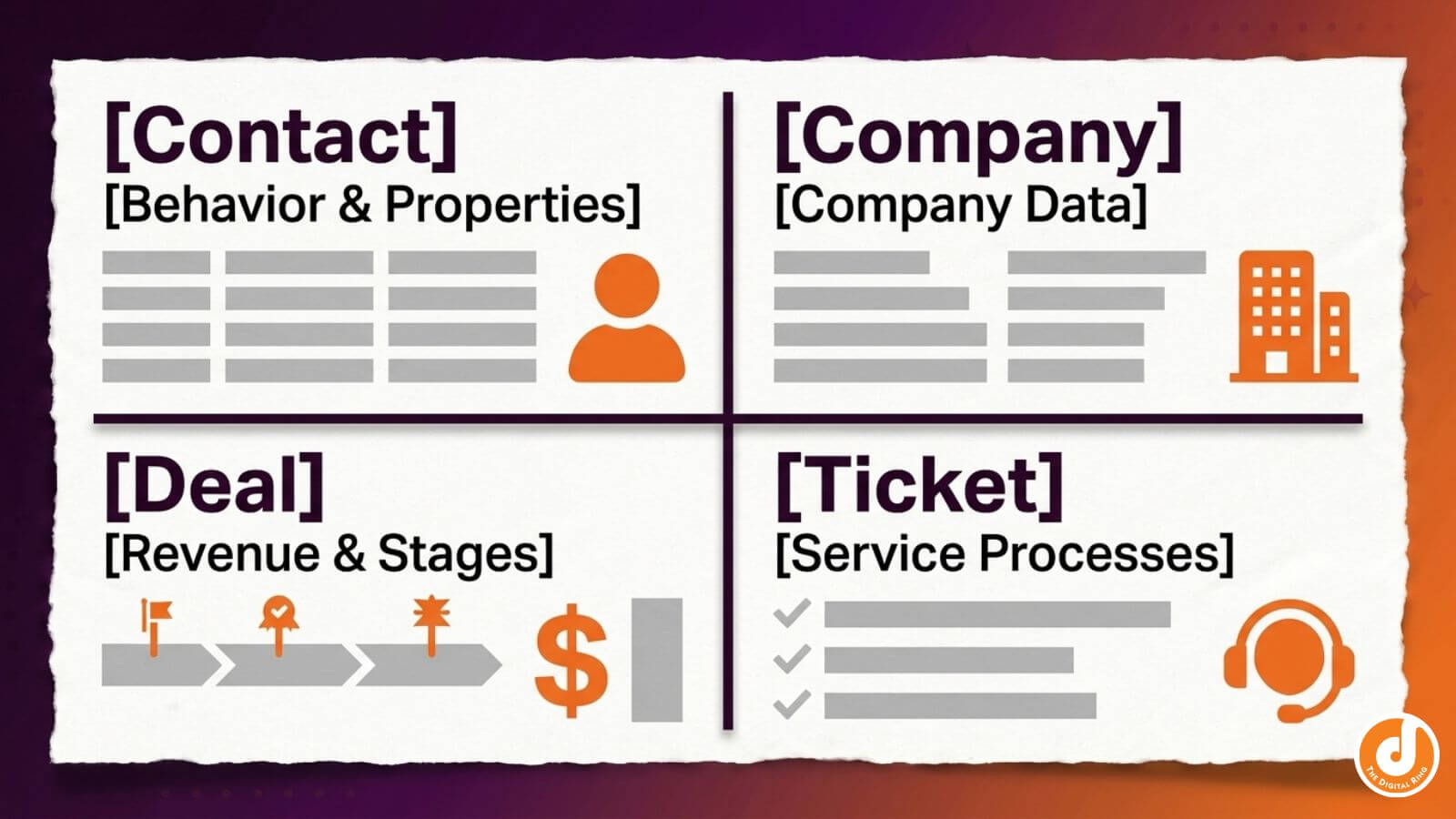
Selecting the wrong object type creates limitations mid-build. For example, a contact-based workflow may not handle deal stage automation effectively.
Understand Workflows vs. Sequences
Confusion between workflows and sequences creates operational overlap. Here’s the difference:
- Workflows are automated processes triggered by conditions and applied to many contacts at once.
- Sequences are one-to-one outreach tools used by sales representatives directly from their inbox.
To put it another way, workflows support scale while sequences support personalized outreach.
Map the Process Before Building
Before opening the workflow builder, document the operational flow:
- Identify the enrollment trigger.
- Define the desired outcome.
- Assign ownership for each step.
- Determine the final state of the contact record.
This simple exercise ensures your HubSpot workflow automations guide internal processes rather than replacing them.
Audit Your CRM Data
Workflow logic depends on property values. If lifecycle stage, contact segmentation fields, or lead source properties are incomplete, automation will behave unpredictably. A quick audit of property usage prevents silent failures later.
Automating CRM functions with HubSpot cuts manual data work by 65% on average, significantly reducing the administrative load tied to updating records, logging activities, and maintaining contact properties. These gains are only possible when workflows are designed around clear processes and reliable data.
Step 2: Building Workflows That Reflect Real Customer Behavior
A workflow that seemingly succeeds on a technical level can still fail operationally. Triggers, delays, and branches should reflect how contacts behave in reality. Automation based solely on internal convenience produces awkward timing and irrelevant communication.
Start with Testing Before Launch
Before enabling any workflow, test it against real scenarios.
Use HubSpot’s test contact feature and validate enrollment triggers, workflow actions, and if/then branches using five to ten contacts that represent both typical cases and edge cases. This step catches logic issues early, before they affect live data.
Once the workflow is live, spot-check immediately. Review enrollment history and contact records for several contacts and look for:
- Unexpected enrollments
- Skipped actions
- Incorrect property updates
- Conflicting automations
Even a quick review can reveal issues before they scale.
Choose the Right Enrollment Triggers
Enrollment triggers determine when contacts enter a workflow. Two common types include:
- Time-based triggers: For example, enroll contacts three days after form submission.
- Event-based triggers: For example, enroll contacts when they click a link or move to a new lifecycle stage.
Event-based triggers often produce more relevant follow-ups because they respond to actual behavior.
Use Smart Delays
Delays help control workflow pacing.
- Fixed delays: Wait a specific time before the next action.
- Event-based delays: Wait until a behavior occurs, such as opening an email or booking a meeting.
Event-based delays keep workflows aligned with customer behavior rather than rigid timelines.
Add If/Then Branches Thoughtfully
If/then branches allow workflows to diverge based on conditions. Use branching when:
- Messaging differs by contact segmentation
- Different teams own the next step
- Engagement behavior changes the next action
Branches can get out of hand quickly, so be thoughtful. At the end of the day, they should simplify decisions rather than create unnecessary complexity.
Examples of High-Impact Workflows
Here are several workflows worth implementing early:
Lead Nurturing Automation
- Enrollment trigger: form submission
- Delay: two days
- Workflow actions: educational email automation sequence
- Property update actions: lifecycle stage changes to marketing qualified lead
- Follow-up: sales task if engagement occurs
Lead nurturing emails sent through workflow automation often achieve 4–10x higher response rates than standalone email blasts. This kind of automated nurture ensures prospects receive timely education while signaling engagement to the sales team.
Deal Stage Automation
- Enrollment trigger: deal moves to “Proposal Sent”
- Workflow actions: internal Slack notification
- Task creation: sales representative follow-up
- Reminder: three-day check-in task
Internal Notifications
- Enrollment trigger: property update actions such as lead score threshold
- Workflow actions: notify account executive
- CRM update: log activity in the contact record
Use Goals and Suppression Lists
Workflow goals help contacts exit automation when they convert. Suppression lists prevent customers from entering lead-stage nurture workflows. These safeguards protect customer experience and prevent redundant messaging.
Step 3: Maintain HubSpot Workflows That Scale With Your Team
Workflows that don't get maintained don't get used. They become outdated, stop reflecting how your team actually operates, and quietly lose the trust of the people who depend on them.
The foundation is clean data. When your CRM properties are accurate and consistent, your team knows what they're looking at, what each workflow is doing, and where contacts are going. Automation built on top of clean data continues to work as the team grows.
Automation built on messy data just makes the mess harder to find.
From there, the goal is to keep workflows accurate over time.. As your contact database grows, new team members come on, and new automations get added, small gaps start to compound. A monitoring habit catches those early.
Monitor Performance and Watch for Signals
After launch, shift from testing to monitoring.
HubSpot’s Analyze tab provides key performance indicators such as enrollment rates, completion rates, and workflow goal conversions. Sudden changes in these metrics often point to upstream issues, such as broken enrollment triggers or inconsistent CRM data.
Monitoring should focus on patterns, not just snapshots. If engagement drops or enrollments spike unexpectedly, something in your logic or data likely changed.
Fix the Most Common Failure Points
Most workflow issues trace back to four root causes.
Poor data hygiene
Enrollment triggers rely on contact properties. If lifecycle stage, lead source, or segmentation fields are inconsistent, contacts may enter workflows incorrectly or skip them entirely. Standardizing property values is a prerequisite for reliable automation.
Re-enrollment misconfiguration
Re-enrollment criteria determine whether contacts can re-enter a workflow. Welcome emails, onboarding flows, and first-time offers should almost never re-trigger. Repeating those messages damages trust quickly, so always review the language before enabling re-enrollment.
Duplicate or conflicting workflows
When multiple teams build independently, overlapping workflows often emerge. One workflow may send nurture emails, another may trigger sales outreach, while a third updates lifecycle stages at the same time. Without coordination, contacts receive conflicting communication. Regular audits help identify and eliminate these overlaps.
Over-fragmented automation
Some teams break workflows into too many small pieces, often to avoid editing larger ones. This creates hidden dependencies that are difficult to trace and maintain. Consolidating workflows improves visibility, as long as your team understands how triggers and actions connect.
Establish Governance That Scales With Your Team
As your workflow library grows, governance becomes essential.
Start with naming conventions. A consistent structure such as:
Team + Purpose + Version + Date
Example:
Marketing_LeadNurture_FormSubmit_V1_2025
Clear naming makes it easier to audit, update, and troubleshoot workflows over time.
Documentation should include:
- Enrollment trigger logic
- Intended audience
- Workflow goal
- Ownership across teams
This becomes especially important in agency environments or organizations with high turnover.
Map Complex Workflows Visually
For larger systems, visual mapping helps clarify how workflows interact.
Tools like Figma or Google Draw allow you to map triggers, delays, branches, communications, and CRM actions across multiple workflows. Focus on relationships and handoffs rather than documenting every individual step. This approach makes it easier to understand dependencies and prevents unintended overlap between automations.
If your team wants help designing HubSpot CRM automation that supports marketing, sales, and customer success together, we can help. We help teams like yours turn automation into operational infrastructure that supports long-term growth.
share this article
.jpg)

Get In touch
We’d love to share how digital marketing can help elevate your brand — and your business’s bottom line.


821 E Washington Ave #200
Madison, WI 53703
608.836.7464


